
Lately I have been traveling for work quite a bit, and having to travel means staying in different Hotels. Any Homelab Junkie knows that means a few things; less than desirable hotel Wi-Fi, and no immediate Homelab access (Unless you’ve set up a VPN connection to your own Homelab, as detailed in my previous blog post.) With that lack of Homelab access, I am restricted to the movies, music and media I have prepared ahead of time, and stored on a hard drive. Now that being said, I could go overkill and bring my rugged 5TB hard drive, but that still doesn’t grant me True Homelab Experience, ie. Virtualized environments, running Docker containers, and all of the bells and whistles I have become accustomed to at home. ALSO, how will my coworkers enjoy the media I am watching? I’d rather we weren’t all crowded around my 13 inch Framework Laptop, watching the latest episode of West World.
That all out of the way, I have been thinking up a way to take my Homelab on the go with me. Now obviously, I cannot travel with a full server rack in my carry-on. I can, however, bring a small virtualized environment (ie. ESXI or Proxmox), running multiple containers, and have whatever media I plan on watching, nice and available for me and my team to enjoy. I have a few specifics that I want to be able to cover with this endeavor. They are listed below:
-Bridged Wireless connection to Hotel Wi-fi. (Bonus points if the Router has VPN capabilities)
-Local Wireless and secure access to available media for authorized users.
-Granular control over all Authorized devices accessing my local network.
-Added layer of network security, to protect any authorized devices.
-Nice and easy-to-use media server software, which can work completely offline.
BONUS:
-UPS capability, in case there is spotty electrical in the Hotel, to ensure health of the equipment and hard drives.
So for this, I’ve looked into a few pieces of equipment. Firstly I need a PC that can handle a virtualized environment. This doesn’t require much, so I think I can contribute one of my spare Mini PCs. The chosen contender is serving no real purpose other than a test environment. The Mini PC in question is a Lenovo ThinkCentre.

This is a great low-power device that is surprisingly capable. Currently I run Proxmox Virtualized Environment on this Mini PC and spin up Virtual Machines on a whim. This is more than capable of handling any virtualized services I need to run on it. Especially with the 1 Terabyte and 16gb of RAM that is on the device currently.
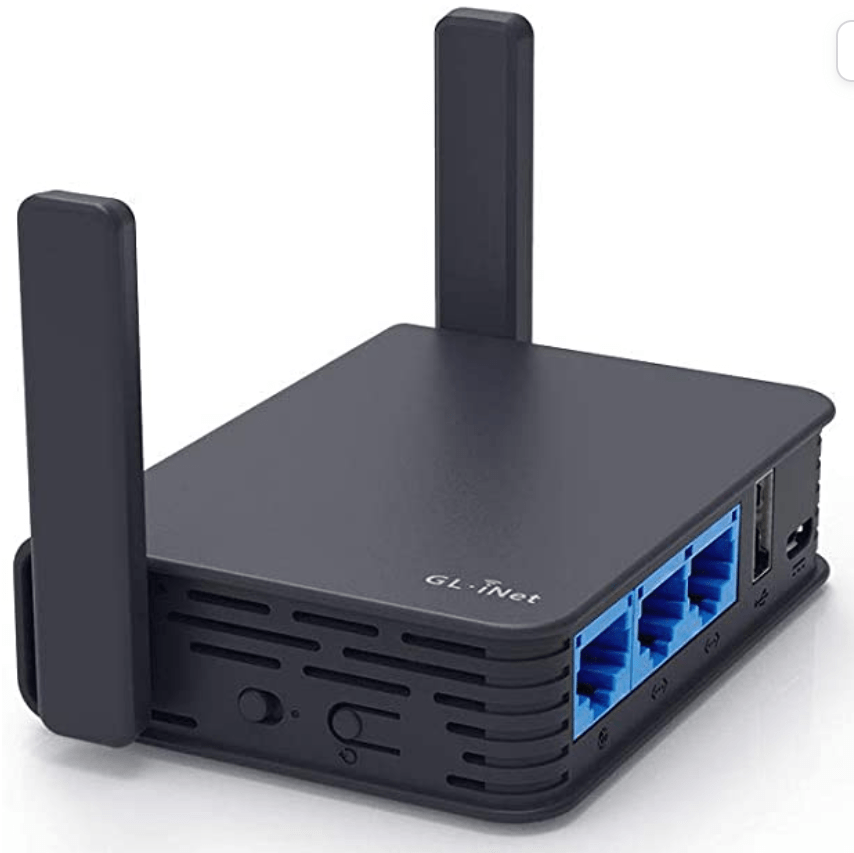
Next piece of equipment that I would like to add to the collection for this project is a Travel router. I am especially interested in the GL-AR750S by GL.iNet. Outside of seeing that this travel router is JAM-PACKED with all kinds of sweet features, (This article gives a sweet rundown of all the bells and whistles) a few of which immediately called out to me (ie. Mullvad VPN Support, Local Media server uses, Plex specifically mentioned, Micro-SD card and USB support) I saw this router showcased in real life during a recent course I took. Our instructor had a very nice setup to include a Mini-PC (a Zotac if I recall correctly), and the GL-AR750S router. All services were run locally without internet, yet the performance was flawless. The beautiful harmony of the Docker Containers providing everything we would need to entertain and communicate OFFLINE, coupled with the access to the media from the comfort of our very own devices in our own space, made me want to switch to this type of setup. Now I know there are still some people reading this thinking that this is unnecessary and overkill. And you are absolutely right, but that is all part of the fun. That being said, I will provide a few reasons this is useful to the average network junkie:
-As mentioned earlier, the usage of multiple devices accessing different content from the same media source can be an invaluable resource while traveling.
-Containerization over a wireless LAN can provide fun and useful resources such as a Chat server for communications in a pinch.
-Dropbox capabilities can be shared on this wireless setup, between all authorized clients, assuming the right Docker containers are spun up.
-Some Hotel Wireless Networks have Device limitations, (ie. Limit 3 devices per room) but using a wireless bridge device with VPN would cloak this device number to the Hotel, and would only show up as a single device, and would allow seamless internet to multiple devices, as well as shared media advantages.
As mentioned there are quite a few Containers that I would like to throw together, to maximize the mileage I can get out of this Media Server. A few ideas that I would start with are below:
- Plex Media Server or some other offline Alternative, ie Jellyfin.
- Filebrowser for Dropbox-like capabilities and file storage.
- Heimdall for organizing all of the resources in an easy-to-use dashboard.
- Transmission for adding media on the go, if there are special requests.
- Radarr/Jackett for movie indexing and searching.
- LibreSpeed for checking connectivity speeds.
- SmokePing for checking Site speed trends over time.
- Portainer for Docker Container Management.
- Uptime-Kuma for service monitoring and notifications.
- Minecraft Server because why wouldn’t I.
- Watchtower to update all containers in the stack.
Shout to this Redditor for being my inspiration.
All in all, I am looking forward to piecing this mini-lab together, setting it all up and testing it all out. I will post updates as I gather parts for this build and keep them posted.
Thanks for reading, take care and keep on learning.
 Greyson's Tech Blog