
What is a VPN?
A Virtual Private Network is an encrypted tunnel that is established between a client (like your computer) and a server (usually hosted remotely) that all traffic passes through, so any hosts on the same network cannot view the encrypted traffic. This in turn makes your traffic origin appear to be the public-facing server allowing for increased anonymity.
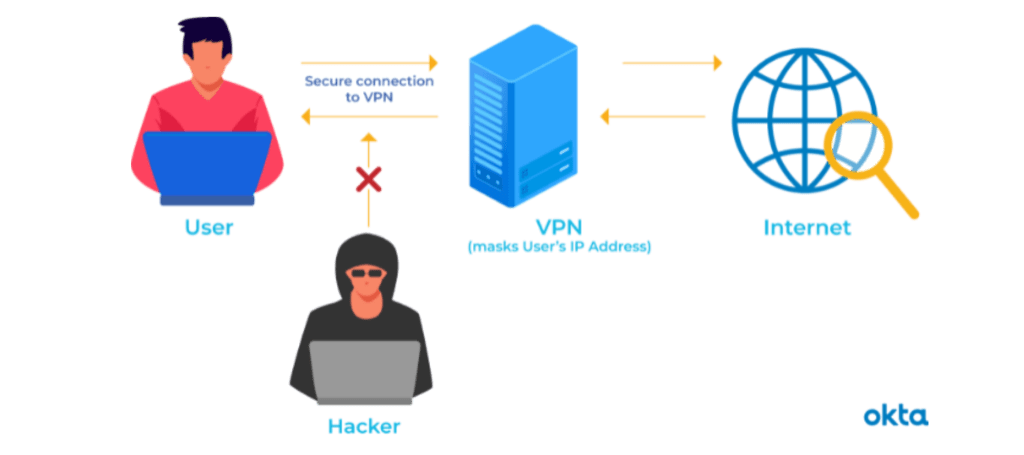
Do I need a VPN?
Short answer: No. Do you absolutely need one to browse the internet uninhibited? Probably not. Will it provide added security when browsing public wifi networks? Absolutely.
Long Answer: While not absolutely necessary, A VPN is a solid tool to have in your toolkit. They are great for ensuring your internet traffic is not being viewed by unauthorized viewers and your traffic is being routed somewhere you trust. In some cases they can be used for circumnavigating geo-blocks and allowing access to content from different regions. VPNs are also great for hiding your network traffic from your Internet Service Provider, since your ISP can view all of your domain requests. Some ISPs will throttle your bandwidth if they notice too many downloads and some even outright block your internet if they notice any potential copyright infringement activities. Now while I am not endorsing Piracy by any means, I am wholly opposed to the idea that an ISP can shutdown your network if they notice you download an episode of Spongebob.
Another selling point you often see in advertisements for VPNs is that using them on public Wifi will safeguard your banking info and browsing data. While this is technically true, just about every reputable site already uses HTTPS (encrypted web traffic) and this is likely just an added measure of security.
What VPN Should I Get?
The VPN I always recommend to anyone looking to set one up is Mullvad. After years of use and after setting it up on countless GUI-based systems and servers alike, I cannot recommend it enough.
WARNING: It is important to be mindful of all programs you install onto your trusted systems, and in this case, of what VPN provider you go with. This article from 2015 illustrates the dangers of choosing untrusted software and the hazards that come with it. Always check multiple trusted sources before installing something with as much access as a VPN software.

Why is Mullvad VPN Better?
Right off the bat, I want to say that I don’t think this VPN Service is superior in ALL aspects. There will be pros and cons with each service you choose. I will cover what I like about it below.
Pros:
- Completely Anonymous Account Creation
- Bitcoin/Anonymous Payment Option
- Built-in Kill-switch
- Easy-to-use GUI
- CLI Options
To create an account with Mullvad, all you need to do is click “Generate Account Number” on this account creation page then boom. Done. Account made. Only payment info is needed at this stage. No personal details, just true anonymity. Payment options are pretty sweet too. You can pay with Card, Paypal, Bitcoin, or hell you can even send them cold hard cash in the mail with JUST YOUR ACCOUNT NUMBER and that will add time to your service.
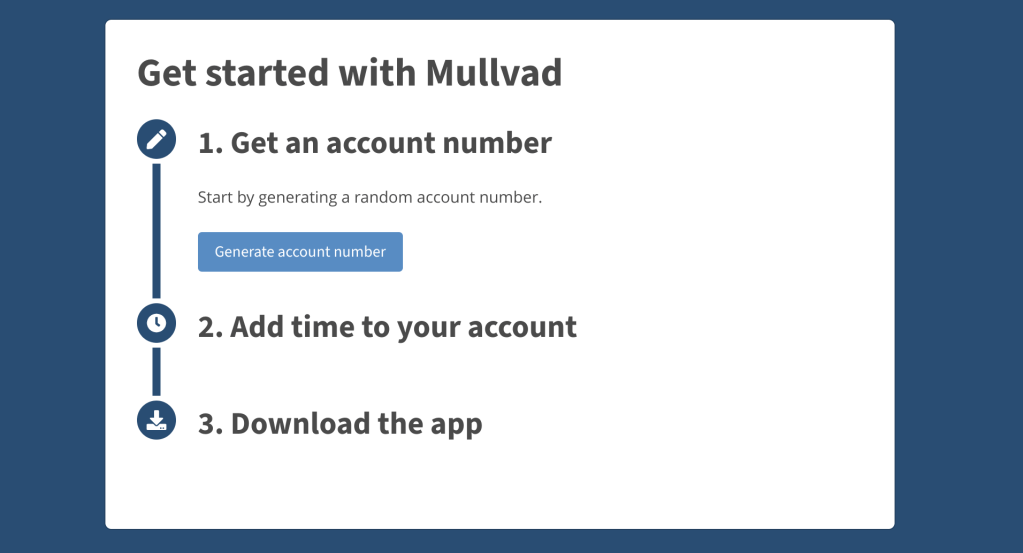
Setting up the VPN via the graphical user interface is a snap. The design is simple and user-friendly regardless of technical expertise. Mullvad also has a built-in killswitch which prevents unencrypted traffic from leaving your system if you enable it. Did you leave a program seeding your favorite Linux ISO? Well if your VPN goes off, your ISP still wont see that torrenting traffic because the killswitch has your back.
Since the VPN service needs to be downloaded from the website and installed as a program, setting up Mullvad on server OSes proved to be a challenge at first. But after discovering the handy dandy Command Line Interface options to control Mullvad, setup is as easy as moving the .deb file over to my Ubuntu Server, and installing the specified program. From there setting up is a few commands. I can go over this in a future post.
Cons:
- Streaming Issues
- No package option
One negative thing I have noticed is Mullvad doesn’t often play nice with streaming services. Netflix, Disney+ and Hulu are all able to detect that a VPN service is being used and often give an error message. I usually disable the VPN and then stream the service and re-enable it later. Another gripe I have is that Mullvad is not readily available in package managers for Linux. Now while there are workarounds for pure terminal usage, one still needs to find the correct version of Mullvad and download it via the browser or wget.
Outside of these few complaints, I have really enjoyed using Mullvad and plan on recommending it to anyone looking for a VPN. Personally, I think everyone should have a VPN and should definitely be using one when on any wifi network that isn’t their own.
I hope this has been helpful and I hope you learned something. If you have any questions, feel free to reach out.
 Greyson's Tech Blog